Preparing for launch…
Agency in a Box — Studio Starter Kit
Rebrand from freelancer to studio: finished agency site template, live-edit proposal, priced service tiers and the ops checklists.
What it does & who it's for
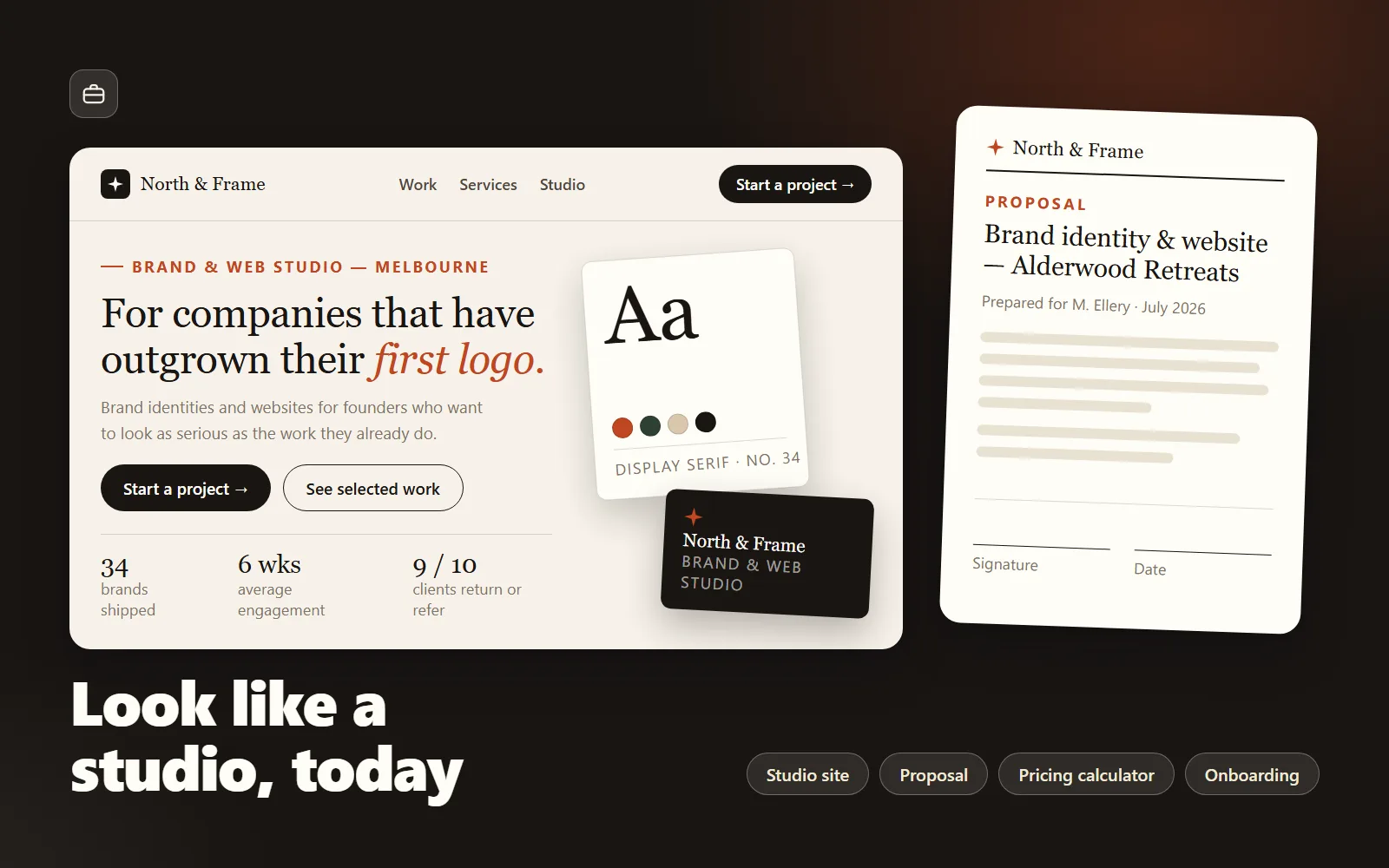
Agency in a Box is everything a working freelancer needs to relaunch as a studio — not a course about doing it, but the finished artefacts themselves. At the centre is a genuinely polished agency website template: hero, services, selected-work grid, process, studio and a wired-up contact form, all in one self-contained HTML file with system fonts, zero dependencies and a design-token block that lets you rebrand the whole page by editing a handful of CSS variables. Try the live demo — that is the actual template from the kit, wearing its worked-example brand. Every file in the kit follows one consistent worked example: a fictional two-person Melbourne studio called North & Frame. You see what a finished positioning statement, a finished three-tier price list, and a finished client proposal look like before you write your own — which is the difference between a template and a blank page with headings. The proposal template runs entirely in your browser: type in the side panel and the document updates live, click any paragraph to rewrite it, investment rows recalculate subtotal, GST and total as you type, everything autosaves locally, and it prints to a clean A4 PDF with the editing chrome stripped out. The business layer is where the price of this kit earns itself back on the first project. The services-pricing spreadsheet ships fifteen priced offerings across four packages — each with honest hour estimates, an internal cost floor, list price, and gross margin calculated for you — and the pricing guide explains the maths so you can rebuild every number for your own market instead of copying someone else's rates. The positioning worksheet gets you from "freelancer who does stuff" to a one-sentence studio positioning with a scored lane-selection matrix and a fully worked example. The onboarding checklist runs every new client from "yes" to testimonial with copy-paste email snippets, and the retainer checklist briefs your lawyer on the sixteen clauses that matter in a design retainer — explicitly a preparation tool, not legal advice. Everything is plain HTML, Markdown and CSV: no build tools, no accounts, no subscriptions. Rebrand the site over two evenings, deploy it free on any static host, and send your first proposal as a studio the same week.
What's included
- Agency website template (site/index.html) — self-contained single file: hero, services, selected-work grid, process, studio, contact form ready to wire to any form endpoint - Client proposal template (HTML) — live-edit side panel, click-to-edit document, auto-calculating investment table with GST toggle, localStorage autosave, print-to-PDF - Services & pricing spreadsheet (CSV) — 4 packages × tiers, 15 priced rows with hours, internal cost floors, list prices and gross margins - Pricing guide — the cost-floor and margin maths behind every CSV column, tier-ratio strategy and AU GST notes - Positioning one-pager worksheet — scored lane-selection matrix, positioning statement formula, fully worked example - Client onboarding checklist — yes → kickoff → delivery → testimonial, with copy-paste email snippets - Retainer agreement checklist — 16 clauses to brief a lawyer with, each with the studio-friendly position (not legal advice) - README-setup guide — 20-minute quick start plus a realistic one-week launch sequence
What's not included
- No legal contract templates — the retainer checklist prepares you to brief a lawyer efficiently; it is not legal advice and not a contract - No hosting, domain or form-endpoint accounts — the README shows free options (Netlify, GitHub Pages, Formspree) but the accounts are yours to create - No logo or custom brand design — the template's design tokens and worked example make rebranding straightforward, but the taste is yours - No CMS — the site is deliberately a single flat HTML file; the README covers adding pages by duplication - No coaching or done-for-you services — support covers the files, not reviewing your business
Requirements
Any computer with a modern browser (Chrome, Edge, Firefox or Safari) — both HTML files run offline by double-clicking. A text or code editor for customising the site (VS Code is free; Notepad works). A spreadsheet app for the CSV (Excel, Google Sheets or Numbers). Basic HTML/CSS comfort — you'll be editing marked text blocks and CSS variables, not writing code from scratch. Worked examples use Australian conventions (AUD, GST, ABN) but adapt anywhere.
Setup instructions
1. Copy the whole folder somewhere permanent (e.g. Documents/Studio Launch) and keep the files together — they reference each other by name. 2. Open deliverables/README-setup.md and read it first — it sequences everything below into a realistic launch week. 3. Double-click site/index.html to see the website template running, then open it in a code editor and search for "EDIT:" — each comment marks a block to replace with your own content; recolour via the :root design-token block at the top. 4. Wire the contact form: create a free form endpoint (e.g. Formspree), paste its URL into FORM_ENDPOINT at the top of the script in site/index.html, and send a test enquiry. 5. Double-click proposal-template.html, put your studio details in the left panel, and rewrite the worked example's scope paragraphs once in your voice — edits autosave in your browser; print to PDF when done. 6. Open services-pricing.csv in your spreadsheet app, save a working copy as .xlsx or a Google Sheet, and rebuild the numbers with your own hourly cost using pricing-guide.md. 7. Work through positioning-worksheet.md (90 minutes), then deploy the site free via Netlify Drop or GitHub Pages as described in the README.
Version history
- v1.0Latest7 Aug 2026
Licence & terms
Licence terms
Single-project commercial licence: your purchase licenses you (one person or one studio) to use these materials to launch and run your own studio — including publishing your customised version of the site template, sending the proposal template to your own clients, and adapting all worksheets and checklists for your own use. You may not resell, redistribute, sublicense, share or republish the files or substantial portions of their content, whether original or modified, including as part of another product, template pack or course.
Refund policy
14-day refund policy: if the product is materially not as described, contact us within 14 days of purchase for a full refund. Please try the live demo before buying — it is the kit's actual website template running in your browser, so you can judge the design quality and level of finish first-hand before spending anything. Refunds are not offered for change of mind. An approved refund ends your licence to the product — you must delete all copies of the files and stop using them.
Support terms
Email support covers the files themselves: something not opening, a customisation step that isn't clear, questions about wiring the contact form, the pricing formulas, or how the documents fit together. A quick sanity-check reply on your positioning statement or tier prices is in scope. Reviews of your specific client contracts, design work on your rebrand, coaching, and legal or accounting advice are not.
These terms are snapshotted at purchase — what you see here is what applies to your order.
Reviews
No reviews yet
Reviews come from verified purchasers only, so you can trust what you read here.
More in Full Business Kits
Other listings buyers compared with this one.