Preparing for launch…
Newsletter Studio in a Box
Launch a paid newsletter business: landing page, 6 email-safe templates, growth + sponsorship + monetisation playbooks.
What it does & who it's for
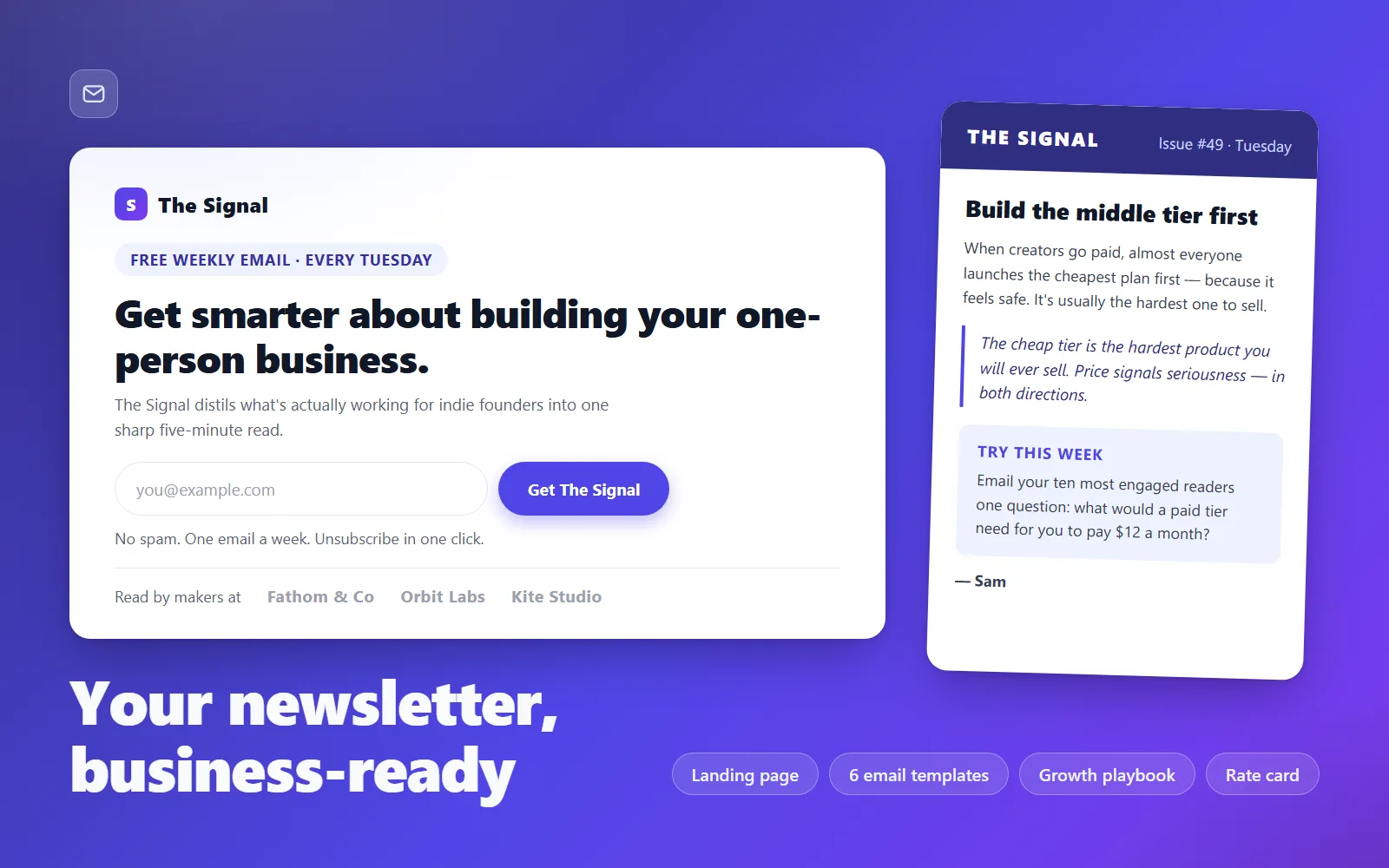
Newsletter Studio in a Box is the complete starting stack for a newsletter business: the subscribe page that grows your list, six issue templates that make every send look professional, and the three playbooks — growth, sponsorship, monetisation — that turn a hobby email into an income. Everything ships as clean, editable files that work with whichever email provider you already use: Mailchimp, Kit (ConvertKit), Buttondown, MailerLite and any other provider that exposes a standard form-post URL and accepts custom HTML campaigns. The landing page is a fast, dependency-free HTML/CSS build with two wired subscribe forms, an open-archive section, testimonial and FAQ blocks, and brand tokens at the top of the stylesheet — edit six variables and the whole page re-skins. The six email templates (essay, curation, interview, product update, digest, announcement) are built the way deliverable HTML email has to be built: 600px table layout, fully inline styles, no external images, fonts or scripts, so they render reliably in Gmail, Outlook and Apple Mail. Each is filled with real, coherent sample issues for a fictional newsletter — The Signal — so you can see exactly how every layout is meant to read before you replace a word. The paperwork is where this kit earns its keep. The growth playbook sequences the road from zero to 1,000 subscribers channel by channel, with realistic conversion numbers, copy-paste outreach scripts and a stop-loss for every channel. The sponsorship kit gives you defensible CPM-based pricing, a rate card you can send as-is, and five outreach emails covering the entire sales cycle from cold pitch to renewal. The monetisation guide walks you through choosing between sponsorship, paid subscriptions, products and services — with the honest maths for each at 1,000 and 5,000 subscribers — and ends with the four-email launch sequence that pairs with the announcement template. A 12-week editorial calendar ties it all together, mapping every week to an issue, a template and a growth action. You could assemble this yourself: learn table-based email HTML, research CPM benchmarks, draft outreach scripts and design a launch sequence. That's weeks of work before you've written a single issue. This kit is that work, done properly, for less than most newsletters' first sponsorship slot — so your energy goes into the only thing nobody can package: the writing.
What's included
- Subscribe landing page (index.html + styles.css) with provider-agnostic email capture, open archive, testimonials and FAQ sections - 6 email-safe newsletter templates (essay, curation, interview, product update, digest, announcement) — 600px tables, inline styles, filled with real sample issues - Growth playbook: 0 to 1,000 subscribers, channel by channel, with scripts and stop-losses (growth-playbook.md) - Sponsorship kit: CPM pricing method, send-ready rate-card template and 5 outreach emails (sponsorship-kit.md) - Monetisation guide: decision framework, worked revenue maths and a 4-email paid-tier launch sequence (monetisation-guide.md) - 12-week editorial calendar mapping issues, templates and growth actions week by week (editorial-calendar.csv — opens in Excel/Google Sheets) - README-setup.md with provider connection tables (Mailchimp, Kit, Buttondown, MailerLite), merge-tag mapping and troubleshooting
What's not included
- An email service provider account or sending infrastructure (bring your own — any provider with form-post signup and custom HTML campaigns works) - Web hosting or a domain for the landing page (free options like Netlify Drop and GitHub Pages are covered in the README) - Payment processing or membership software for a paid tier - Logo or custom illustration assets — the kit re-skins via CSS tokens and text, not bundled artwork - Your newsletter's actual content — the sample issues show the layouts; the writing is yours - Substack-native templates (Substack blocks custom HTML; the README explains how the kit still applies)
Requirements
A code or text editor (VS Code is free) and the ability to edit HTML attribute values by following instructions — no programming needed, but you shouldn't be scared of angle brackets. An account with an email provider that supports embedded/HTML signup forms and custom HTML campaigns (Mailchimp, Kit/ConvertKit, Buttondown, MailerLite, EmailOctopus and similar). Any static hosting for the landing page (free tiers are fine). A modern browser for previewing.
Setup instructions
1. Unzip the kit and open deliverables/README-setup.md — it is the map for everything below. 2. Open landing-page/index.html in your browser straight from disk to tour the page, then open a couple of email templates the same way. 3. Connect the subscribe form: copy your email provider's form-post URL from its embed code and paste it into the action attribute of both forms in landing-page/index.html, matching the email field name per the README's provider table (step 2). 4. Test the form with a real email address and confirm the subscriber appears in your provider. 5. Personalise the landing page: newsletter name, promise, archive links, contact email, and the six brand tokens at the top of styles.css. Replace or remove the sample proof strip and testimonials. 6. Publish the landing-page folder to any static host (Netlify Drop, GitHub Pages, Cloudflare Pages — walkthrough in README step 4). 7. Load your first template into your provider's custom-HTML editor, swap the four footer merge tags using the README's mapping table (step 3), and send yourself a test. 8. Open editorial-calendar.csv in Excel or Google Sheets, fill the bracketed slots with your niche, and start week 1 alongside Parts 1-2 of growth-playbook.md.
Version history
- v1.0Latest27 July 2026
Licence & terms
Licence terms
Single-project commercial licence. You may use, modify and publish everything in this kit for one newsletter/brand you own, including commercial use (paid subscriptions, sponsorships, client-facing sends for that one project). You may not resell, redistribute, sublicense or repackage the files or any substantial part of them — including as part of another template, kit or marketplace listing — and you may not use them to build a competing product. A second newsletter or a client project requires a second licence.
Refund policy
14-day refund if the product is materially not as described — file a request with what you expected versus what you received and we'll make it right or refund you. Please try the live demo first: it is the kit's actual landing page, so you can judge the build quality before buying. Refunds aren't available for change of mind after the files have been downloaded, or because your email provider doesn't support custom HTML (check the requirements — the README lists compatible providers). An approved refund ends your licence to the product — you must delete all copies of the files and stop using them.
Support terms
Email support covers getting the kit working: connecting the form to your provider, merge-tag mapping, template rendering issues and publishing questions. It does not cover custom design work, writing your issues, or acting as your provider's helpdesk. Response within 2 business days.
These terms are snapshotted at purchase — what you see here is what applies to your order.
Reviews
No reviews yet
Reviews come from verified purchasers only, so you can trust what you read here.
More in Full Business Kits
Other listings buyers compared with this one.