Preparing for launch…
Horizon — SaaS Landing Page Template
Premium one-page SaaS landing template — sticky nav, pricing toggle, FAQ accordion — rebrandable in one CSS line.
What it does & who it's for
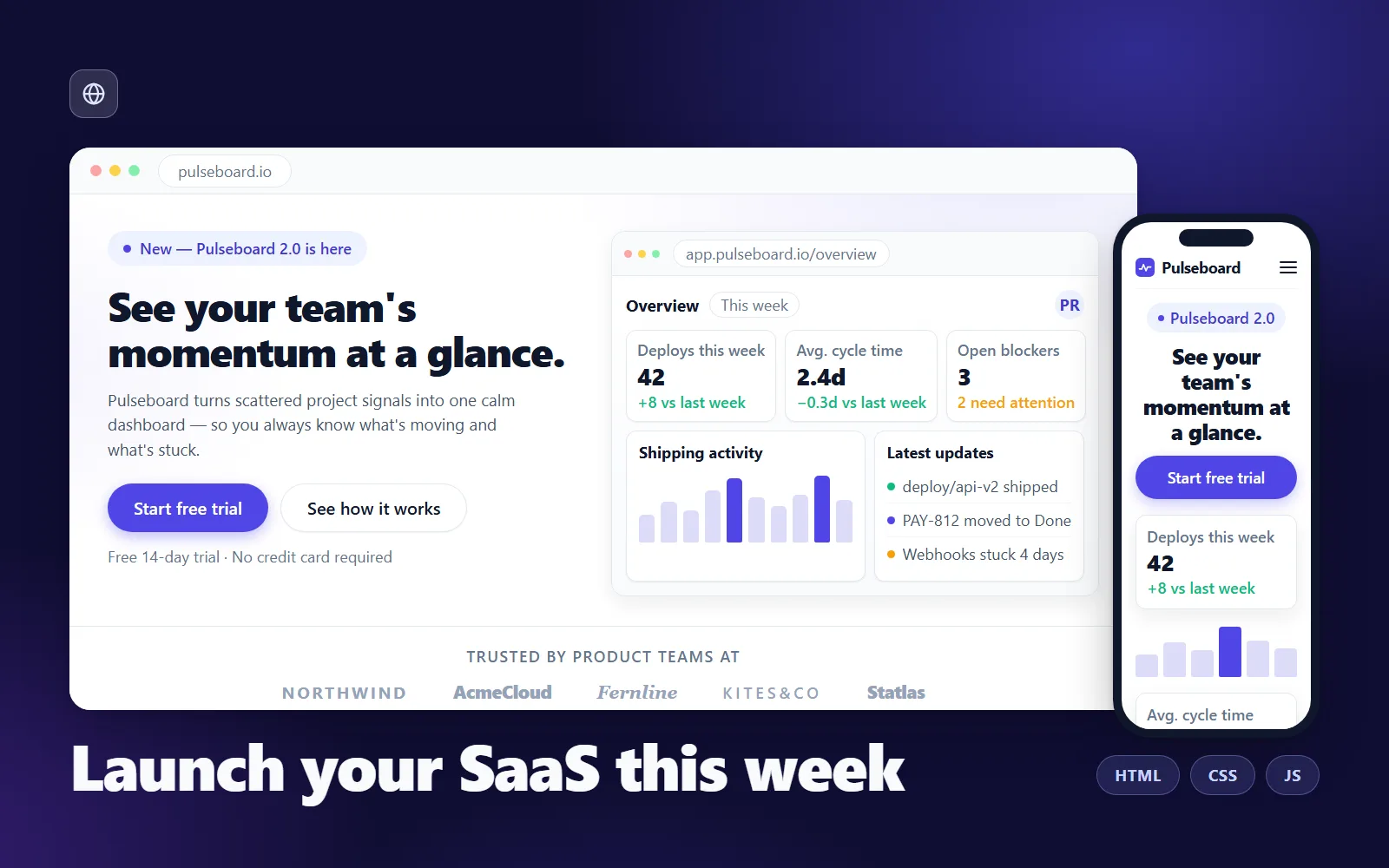
Horizon is a complete, production-ready landing page for a SaaS product, shipped as three hand-editable files: index.html, styles.css and script.js. Every section a modern SaaS site needs is already built and filled with realistic demo copy for a fictional product called Pulseboard: a sticky glass-blur nav, a hero with a browser-framed product mock, a customer logos strip, three feature rows in alternating layout, a three-tier pricing table with a working monthly/annual toggle, testimonials, a six-question FAQ accordion, a gradient CTA band and a five-column footer. It's built for founders, indie hackers and agencies who need a credible marketing site this week, not after a framework detour. There is no build step, no npm and no dependencies — double-click index.html and the whole page runs straight from your file system. Rebranding is genuinely one line: every colour, radius, shadow and font decision funnels through CSS custom properties in a single :root block, so changing --accent restyles buttons, badges, chart bars, the CTA gradient and focus rings in one edit. Pricing lives in data attributes on the HTML, so you never touch the JavaScript to change your numbers. The craft details are handled the way you'd want to do them yourself if you had the time: semantic HTML with a proper heading ladder, an accessible disclosure-pattern FAQ, a role="switch" pricing toggle with visible focus rings, a mobile nav that closes on Escape and returns focus, reveal-on-scroll that respects prefers-reduced-motion, and a page that stays fully readable with JavaScript disabled. The product screenshot in the hero is drawn in pure HTML/CSS, so the template ships with zero image files — keep the mock and relabel it, or swap in a real screenshot with one img tag. DIY-ing this means days of layout, breakpoint and accessibility work before you write a single line of your own copy. Horizon gets you to "replace the words, change one colour, drag the folder onto Netlify" — and the live demo is the actual template, byte for byte, so you can test every interaction before you buy.
What's included
- index.html — the complete one-page template with realistic demo copy for a fictional product ("Pulseboard") - styles.css — the full design system, driven by CSS custom properties for one-line rebranding - script.js — five dependency-free behaviours: mobile nav, sticky header shadow, pricing monthly/annual toggle, FAQ accordion, reveal-on-scroll - README-setup.md — quick start, one-line rebrand, swapping copy and screenshots, fonts, and deploying to Netlify/Vercel/GitHub Pages - customisation-guide.md — section-by-section walkthrough of every block, the JavaScript behaviour by behaviour, and accessibility notes
What's not included
- No page builder or CMS integration — this is a hand-editable static template - No image assets: the hero product shot is a pure HTML/CSS mock (swap in your own screenshot with one img tag, instructions included) - No contact-form backend, analytics or email-capture service — wire buttons to your own endpoints - No additional pages (blog, docs, legal) — Horizon is a single landing page - The logos strip ships as styled text wordmarks, not real company logos
Requirements
Any modern browser (Chrome, Edge, Firefox, Safari), a text editor (VS Code, Sublime — anything), and a static host to deploy to (Netlify, Vercel and GitHub Pages all have free tiers). No npm, no build tools, no server-side code. Basic HTML/CSS comfort helps, but every edit you're likely to make is documented step by step.
Setup instructions
1. Download and unzip your purchase anywhere on your computer. 2. Double-click index.html — the full page opens and works straight from your file system, including the pricing toggle and FAQ accordion. 3. Open styles.css and set --accent (plus --accent-strong and --accent-soft) in the :root block to your brand colour — the whole page rebrands from these three values. 4. In index.html, search for "Pulseboard" and replace the demo copy section by section — each section is marked with a comment banner (HERO, PRICING, FAQ, etc.). 5. Update your prices by editing the data-monthly and data-annual attributes on each .price-amount element — the toggle script reads them automatically. 6. Optional: replace the hero's HTML/CSS dashboard mock with a real product screenshot — swap the .app-mock div for one img tag as shown in README-setup.md. 7. Deploy: drag the folder onto app.netlify.com/drop (or use Vercel / GitHub Pages — all three are covered in README-setup.md). You're live.
Version history
- v1.0Latest5 Aug 2026
Licence & terms
Licence terms
Your purchase grants a single-project commercial licence: use Horizon to build one website for yourself or one client, including modifying it freely for that project. You may not resell, redistribute, sublicense or re-list the template (or a derivative of it) as a template, theme or starter kit, whether free or paid. For additional projects, purchase an additional licence.
Refund policy
14-day refund policy: if the template is materially not as described on this page, contact us within 14 days of purchase with details and we'll make it right or refund you. Please try the live demo before buying — it is the actual template with every interaction working, so you can verify exactly what you're getting. Refunds are not offered for change of mind. An approved refund ends your licence to the product — you must delete all copies of the files and stop using them.
Support terms
Email support covers questions about customising the template's own code — rebranding, editing sections, the pricing toggle, deploying. Building new sections or pages for you, custom design work, and debugging third-party integrations are outside support scope.
These terms are snapshotted at purchase — what you see here is what applies to your order.
Reviews
No reviews yet
Reviews come from verified purchasers only, so you can trust what you read here.
More in Websites & Landing Pages
Other listings buyers compared with this one.