Preparing for launch…
LaunchPage Pro — SaaS Landing Template
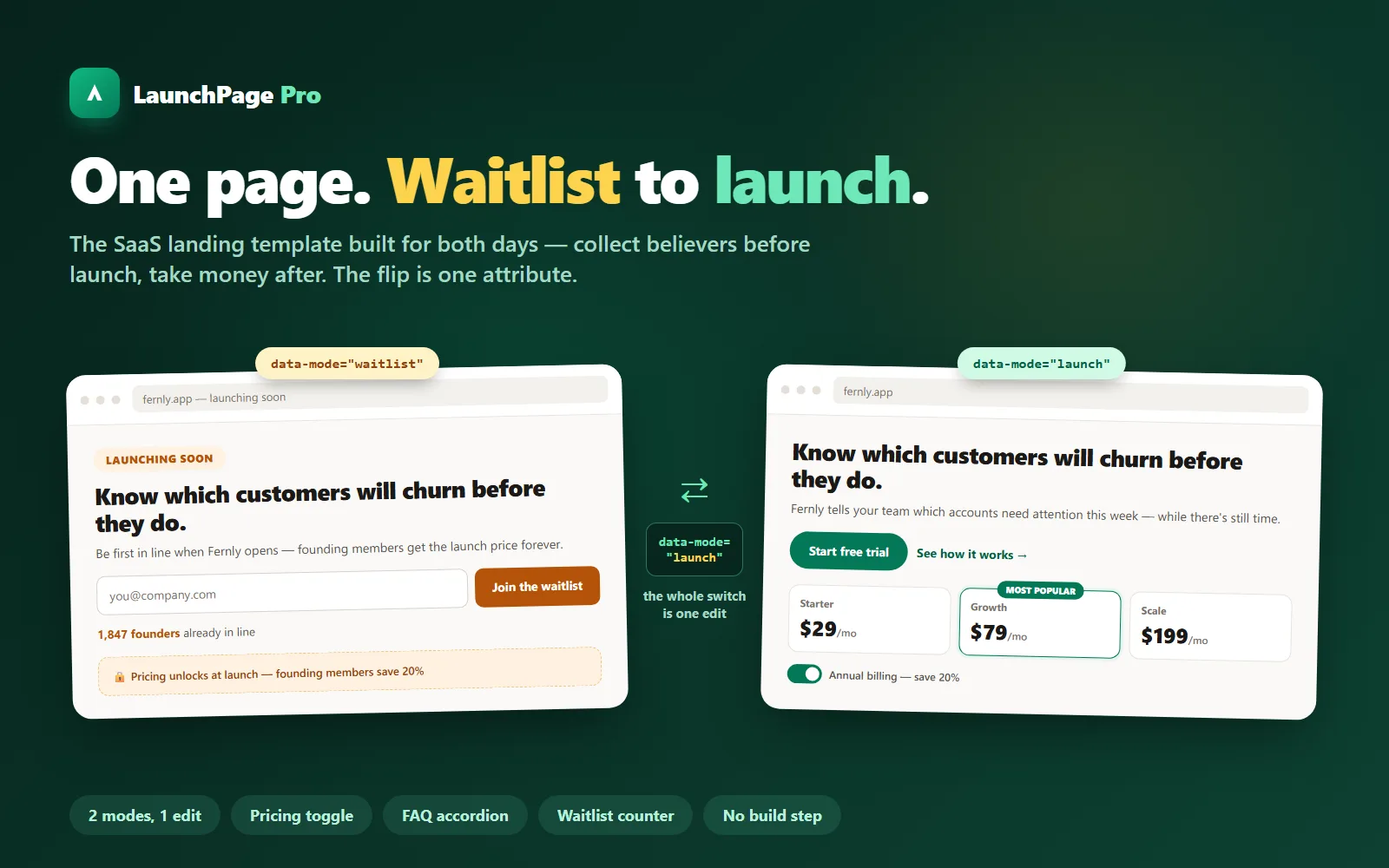
The SaaS landing template built for both days: waitlist mode before launch, full pricing after — and the flip between them is a single attribute.
What it does & who it's for
Most landing templates assume you've already launched. LaunchPage Pro assumes you'll launch twice — once to collect believers, once to take money — and makes the switch between those two days a one-attribute edit. In waitlist mode, the hero becomes an email capture with a live position counter ("1,847 founders already in line"), pricing hides behind a founding-member teaser, and the logo strip becomes waitlist proof. On launch day you change data-mode="waitlist" to data-mode="launch" on the body tag and deploy: trial CTAs, the three-plan pricing table with its monthly/annual toggle, and customer logos all switch on. The mechanics are pure CSS, so the flip works even with JavaScript disabled — and you can make any element of your own mode-specific by adding one class. The page itself is the full conversion stack: hero with an objection-killing note line, social-proof strip, three-step how-it-works, six-card feature grid, testimonials, pricing with the billing toggle, a seven-item FAQ accordion built on the accessible disclosure pattern, and a final CTA band. Eight small vanilla-JS behaviours run it all — mode engine, waitlist counter, form guard, mobile nav, header shadow, billing toggle, FAQ, scroll reveal — each deletable independently. No build step, no npm, no frameworks: three files are the whole site, and they work straight off your file system. The waitlist form POSTs a single email field to any endpoint; the included guide wires it to Netlify Forms, Formspree or Buttondown in about five minutes each. Until an endpoint is set, submissions show a friendly setup reminder instead of a browser error — an unwired page never looks broken. The live demo is the actual template with its sample brand (Fernly, a fictional churn-prediction SaaS) and a switcher to flip between both modes — try the billing toggle, the FAQ, and join the fake waitlist to watch the counter move. The download is the same code with two deep guides: a section-by-section customisation walkthrough with the copy framework for every block, and the waitlist-mode manual.
What's included
- index.html — the complete one-page template (9 sections), shipped in launch mode with sample copy - styles.css — all styling; rebrand from the :root token block (three accent values) - script.js — eight dependency-free behaviours incl. the mode engine, billing toggle and waitlist counter - README-setup.md — the 2-minute start, rebranding, deploying (Netlify / Vercel / GitHub Pages) - customisation-guide.md — section-by-section walkthrough with the copy framework and worked examples for every block - waitlist-mode.md — the mode switch, the position counter, and 5-minute form wiring for Netlify Forms, Formspree or Buttondown
What's not included
- Hosting (any static host works — deployment guides included) - A form/email backend (the guide wires the free tiers of Netlify Forms, Formspree or Buttondown) - Real product screenshots — the hero mock is drawn in HTML/CSS; swapping in your own screenshot is a documented one-block edit - Multi-page sites — this is deliberately one high-converting page
Requirements
- A text editor and a browser — the template runs from your file system - A static host to go live (Netlify's free drag-and-drop is the fastest path) - No Node, no build tools, no frameworks
Setup instructions
1. Unzip and double-click index.html — everything works locally, straight away. 2. Flip data-mode on the body tag to "waitlist" and reload to see the other half of the product. 3. Rebrand: change the three accent values in styles.css :root, swap the brand lockups, retitle the head tags. 4. Rewrite the copy section by section with customisation-guide.md open — it has the framework and a worked example for every block. 5. Wire the waitlist form to Netlify Forms, Formspree or Buttondown (waitlist-mode.md, ~5 minutes). 6. Deploy: drag the folder onto Netlify Drop (or Vercel / GitHub Pages — all covered in the README).
Version history
- v1.0Latest2 Aug 2026
Licence & terms
Licence terms
Single-project commercial licence. Use LaunchPage Pro to build one website — yours or a client's — and modify it freely for that project. Each additional site needs its own licence. You may not resell, redistribute or re-list the template or a derivative of it as a template, theme or product, whether paid or free.
Refund policy
14-day refund if the product is materially not as described in this listing or its demo. The demo is the real template — flip both modes and test every behaviour before buying. Refunds are not offered for change of mind. Open a refund request from your Launchstock library and we will respond within 2 business days. An approved refund ends your licence to the product — you must delete all copies of the files and stop using them.
Support terms
Email support for 3 months from purchase, replies within one business day. Covers setup, deployment, the customisation guide and form wiring on an unmodified template. Bespoke design work beyond the guides is available as paid studio work.
These terms are snapshotted at purchase — what you see here is what applies to your order.
Reviews
No reviews yet
Reviews come from verified purchasers only, so you can trust what you read here.
More in Websites & Landing Pages
Other listings buyers compared with this one.