Dealwright — Local-First CRM in React and TypeScript
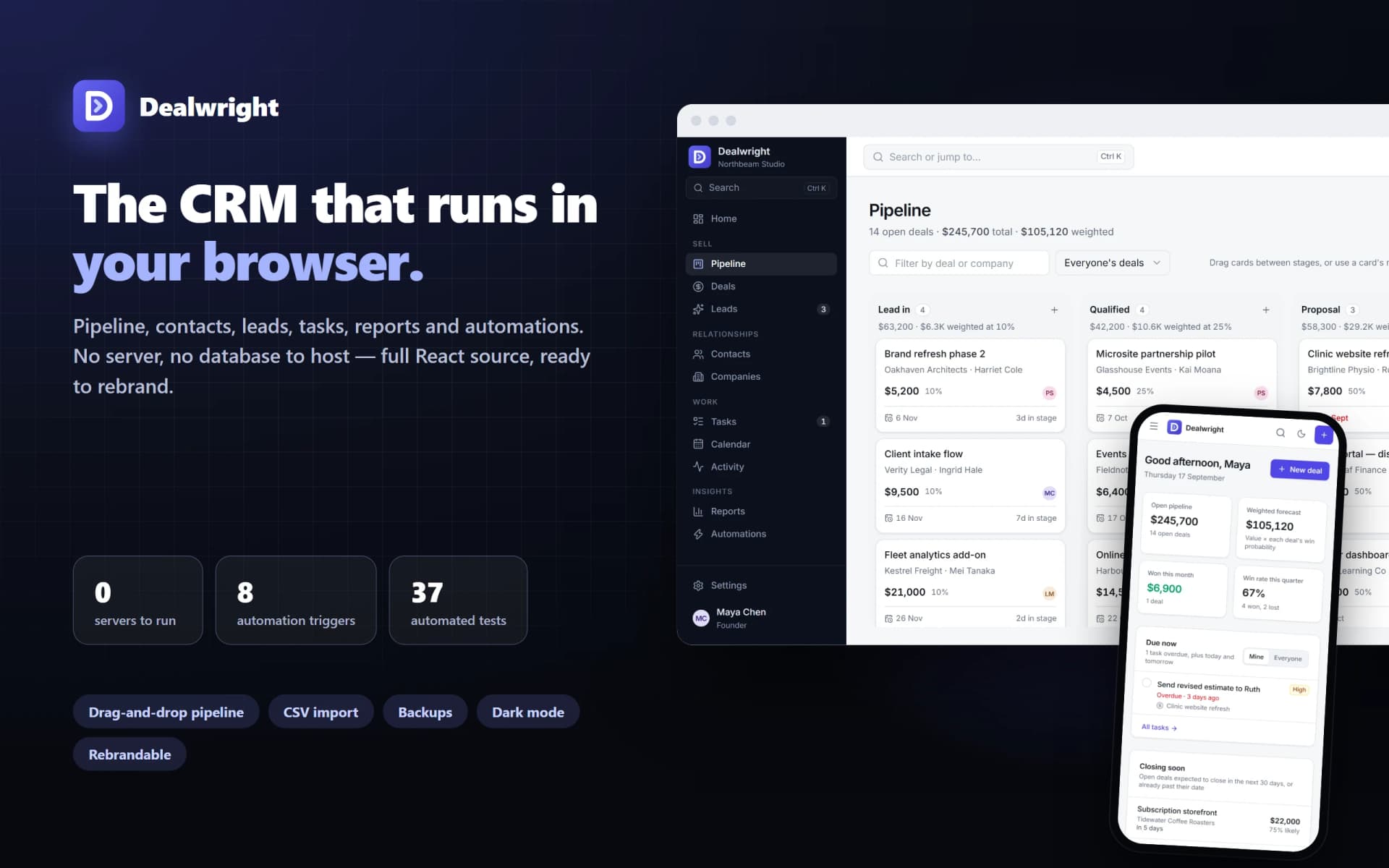
A complete CRM that runs in the browser — pipeline, contacts, leads, tasks, reports and automations — with no server or database to host. Upload the built app and use it today, or rebrand the full React and TypeScript source.
Dealwright — Local-First CRM in React and TypeScript
What it does & who it's for
Dealwright is a CRM for freelancers, studios and small teams that runs entirely in the browser. There is no backend to host, no database to run and no account to create: upload one folder to any static host and it works, with records saved in the browser on the device that uses it.
The pipeline is a board of your deal stages. Drag deals between stages — or use the menu on each card — and see each stage's total, its weighted value and how long every deal has sat there. Marking a deal lost asks why, and the reasons show up in the reports. Each deal has its own page with a stage path, its activity, its tasks and an optional win probability that overrides the stage default.
Contacts and companies have timelines of calls, emails, meetings and notes, their deals and their tasks, and "last contacted" updates itself whenever a call, email or meeting is logged. Leads carry a status, source, fit score and estimated value, and convert in one step into a contact, a company and a deal, keeping their activity. Tasks have due dates, times, priorities, owners and related records, grouped into overdue, today, tomorrow and later, and a month calendar shows tasks and meetings together.
Reports are calculated from your records, never filled with placeholder figures: won value, win rate, average deal size, days to win, open and weighted pipeline, won and lost by month, results by owner, lead-source conversion and lost reasons, for a period that follows your financial year. Where there isn't enough data to say something, the report says so rather than showing a number.
Automations handle routine follow-up: when a deal is won, create a kickoff task and tag it; when a lead arrives, assign a first-contact task. There are eight triggers and four actions, a plain-English description of every rule, and a log of every change a rule made. Email templates fill in names, company and deal, then open in your own email app to send, and can log the email on the timeline.
Your data stays yours. Full JSON backups restore in any browser, CSV import matches columns from spreadsheets and other CRMs, and contacts, companies, deals, leads and tasks export to CSV. Tasks and meetings export to an .ics calendar file.
It is honest about what it is. Data lives in one browser: it does not sync between devices or people, there are no logins, and keeping backups is the owner's job — Settings says so, shows when the last backup was taken, and can ask the browser to protect the data from automatic clean-up. It doesn't send email or sync calendars, and automations run while the app is open, when a change is saved.
Under the hood it is React 19, TypeScript and Tailwind CSS 4, with every business rule — probabilities, reports, automation logic, CSV and calendar handling — in plain, unit-tested functions, and every write going through one repository file. That makes it straightforward to rebrand (one config file for the name, storage key and accent colours), to extend, or to put behind your own server: the documentation includes a guide to exactly which two files change. It works on phones and desktops, in light and dark mode, and from the keyboard.
The live demo is the built app, loaded with a sample design studio's workspace. Every screen and feature is there; the demo keeps its data in memory so each visitor starts fresh, and downloads are switched off inside the preview frame.
What's included
- app/ — the finished app, already built: upload the folder to any static host (Netlify, Cloudflare Pages, Vercel, GitHub Pages, S3 or your own site)
- source/ — the complete React 19 and TypeScript source with Vite and Tailwind CSS 4 configuration, sample data, the demo build, and 37 unit tests for the business rules and data layer
- documentation/ — getting started and backups, rebranding, importing and exporting, how the code is arranged (with a worked example), the data model, and putting a server behind it
- README.md — what's in the download, the first three steps, and what to know before relying on it
- LICENCE.md — the commercial licence in plain English
- THIRD-PARTY.md — licence notices for the open-source packages in the app
What's not included
- A server, sync or logins: data lives in the browser that uses it, and doesn't move between devices or people except by backup and restore (the documentation explains how to add a backend)
- Sending email, inbox sync or calendar sync: emails open in your own email app, and the calendar export is a one-off file
- Scheduled or time-based automations: rules run while the app is open, when a change is saved
- File attachments, custom fields without code changes, multiple pipelines, user permissions, or installing as an offline app
- Hosting, a domain, or setting it up for you
Requirements
- A current version of Chrome, Edge, Firefox or Safari for each person using it
- Any static web host to publish app/ (free tiers are fine); HTTPS recommended
- To change or rebrand the source: Node.js 22.12 or later and some familiarity with React and TypeScript
- No server, database or third-party account
Setup instructions
- Download and unzip the package.
- Upload the contents of app/ to a static host — for example, drag the folder onto app.netlify.com/drop.
- Open the address and choose Explore with sample data to look around, or Start fresh for an empty workspace with a ready-made pipeline, starter automations and email templates.
- To bring existing records across, go to Settings → Data & backups → Import from CSV.
- Download a backup from Settings → Data & backups, and keep doing so regularly.
- To rebrand it, follow documentation/rebranding.md: set the name, storage key and colours in source/src/brand.ts, run npm install and npm run build, and publish the new dist/ folder.
Version history
- v1.1Latest17 Sept 2026
- v1.017 Sept 2026
- v1.017 Sept 2026
- v1.017 Sept 2026
Licence & terms
12 months email support
Licence terms
Non-exclusive commercial licence. Use Dealwright to run your own business with as many people as you like; set it up for clients and charge for that work; rebrand it and change anything — name, design, copy, data model and code; and offer a rebranded, meaningfully changed version to your own customers, including for a fee. The licence does not expire and has no reporting, attribution or revenue share, and you own whatever you add and all data you put into it. You may not resell, sub-license or give away the source code as a template, starter kit, boilerplate or course resource, offer it unchanged apart from its name and colours as a competing product, or claim exclusivity. The open-source packages it is built on stay under their own licences: keep THIRD-PARTY.md with the app you publish. Full terms in LICENCE.md.
Refund policy
14-day refund if the product is materially not as described — for example the app does not run, files are missing from the download, or it does not match this listing. Change of mind is excluded: the complete app is usable in the live demo before you buy, so you can check the product itself rather than a description of it. Nothing here limits your rights under Australian Consumer Law. An approved refund ends the licence: delete your copies.
Support terms
Email support for 12 months from purchase, for setup and publishing questions and for defects in what this listing describes. Email support@launchstock.app or reply to your receipt, and a person answers. Defects are fixed free within that period; help with your own changes to the code, and building new features, are not included.
These terms are snapshotted at purchase — what you see here is what applies to your order.
Reviews
No reviews yet
Reviews come from verified purchasers only, so you can trust what you read here.
More in Sales & Marketing
Other listings buyers compared with this one.
 AI Tool
ReviewRadar — AI Review Responder
Reads your Google, Facebook and Trustpilot reviews and drafts on-brand responses for approval — grateful, specific, never defensive. And it knows which reviews to refuse.
 LaunchStock$199
 Template
ColdStart — B2B Outreach Engine
36 cold-email templates across 6 sequences, plus the playbook, reply scripts, research checklist and tracker to run them as a system.
LaunchStock$45